MPTAAS Scholarship Status 2026: Check Application & Payment Status Online Easily

Every year, thousands of students from Madhya Pradesh apply for the MPTAAS scholarship. They fill out the form, upload their documents, and then wait. Days pass. Sometimes weeks. And the one question that never leaves their mind is — what is my MPTAAS scholarship status right now?
If you are one of those students, you are in the right place.
This guide will walk you through everything. You will learn how to check your MPTAAS scholarship status in just a few steps. You will also understand what each status type means and what to do if your payment has not come yet.
Let us start from the beginning.
What Is MPTAAS and Why Does the Status Matter?
MPTAAS stands for Madhya Pradesh Tribal Affairs Automation System. It is a digital platform launched by the Tribal Welfare Department of the Madhya Pradesh Government.
The portal gives financial support to students from Scheduled Caste (SC), Scheduled Tribe (ST), and Other Backward Class (OBC) communities who are studying in Class 11, Class 12, undergraduate, postgraduate, or professional courses.
The scholarship amount ranges from ₹230 to ₹1,500 per month, depending on your course and whether you are a hosteller or a day scholar. This money goes directly into your bank account through Direct Benefit Transfer (DBT). There is no middleman. There is no office visit needed.
But the scholarship does not just land in your account automatically. It moves through stages. Your application goes from submission to verification to approval to payment. Each stage has a different status on the portal.
That is why checking your MPTAAS scholarship status regularly is so important. It tells you exactly where your application stands. If something is wrong — a missing document, a verification delay, or a bank linking issue — you can catch it early and fix it before you miss out.
What You Need Before Checking Status
Before you log in to check your status, keep these details ready:
- Your MPTAAS User ID or Profile ID
- Your password (set during registration)
- Your Application Reference Number (from the confirmation receipt)
- Your Academic Year (2025–26 for current students)
If you have all of these, you are ready to check your status in under two minutes.
How to Check MPTAAS Scholarship Status 2026 — Step by Step
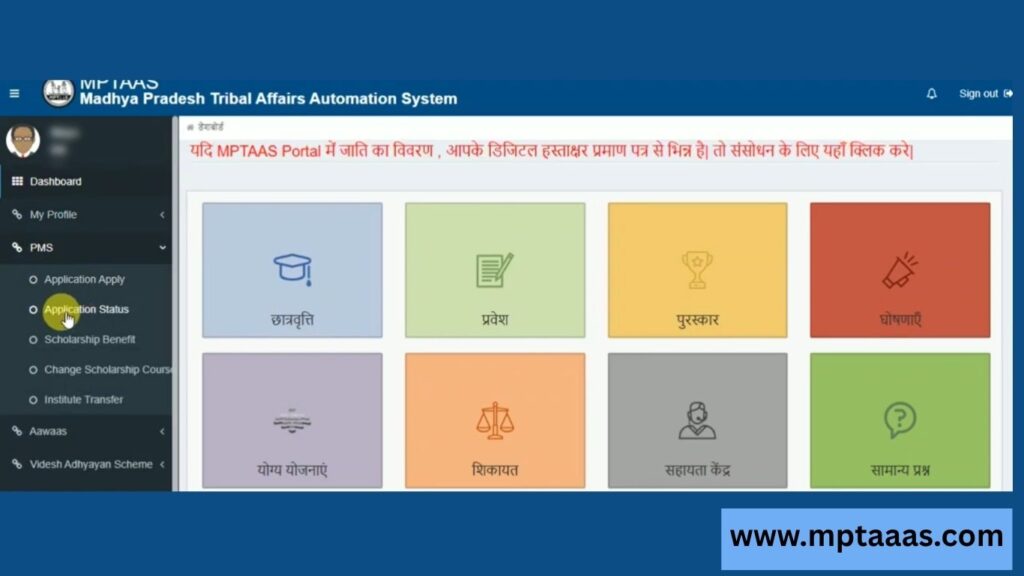
There are two ways to check your status. The first method requires login. The second method works without login using your application number.
Method 1: Check Status After Login
This is the most detailed method. It shows you your application status, payment status, NPCI status, and scholarship amount — all in one place.
Step 1: Open your browser and go to the official MPTAAS portal — tribal.mp.gov.in/MPTAAS
Step 2: On the login page, enter your User ID or Profile ID, your password, and the captcha code shown on screen. Then click the Login button.
Step 3: Your student dashboard will open. Look at the left sidebar. Click on PMS (Post Matric Scholarship).
Step 4: A dropdown menu will appear. Click on Application Status.
Step 5: Select your Academic Year (2025–26). If asked, enter your Application ID. Then click Submit.
Your current status will appear on the screen immediately. You will see your application status, payment status, NPCI status, and the scholarship amount approved for your account.
Method 2: Check Status Without Login
If you do not remember your login credentials, there is still a way to check your status.
Step 1: Go to the MPTAAS portal homepage at tribal.mp.gov.in/MPTAAS
Step 2: On the homepage, click the “Track Application Status” button.
Step 3: Enter your Application ID and your Academic Year.
Step 4: Click Submit. Your current status will be shown.
This method is quick, but it shows only basic status information. For full payment details, log in to your account.
MPTAAS Scholarship Status Types — What Each One Means
Once you check your status, you will see one of these labels on the portal. Each one means something different. Here is a clear breakdown.
1. Pending / Pending for Verification
This means your application has been submitted but it has not been verified yet. It is sitting in the queue, waiting for your Nodal Officer at your college to review and verify your documents.
This is a very common status and it does not mean something is wrong. It simply means the verification process is still going on.
What to do: If your status has been pending for more than two to three weeks, visit your college and remind your nodal officer to verify your documents on the portal.
2. Approved
This is the status every student wants to see. Approved means your application has been reviewed and your nodal officer has given the green light. Your scholarship is confirmed.
Once your status shows Approved, the payment process begins. You can expect your scholarship amount to be credited to your bank account soon, depending on the department’s disbursement schedule.
What to do: Nothing urgent. Just make sure your Aadhaar-linked bank account is active and your NPCI status is showing as Active.
3. Rejected
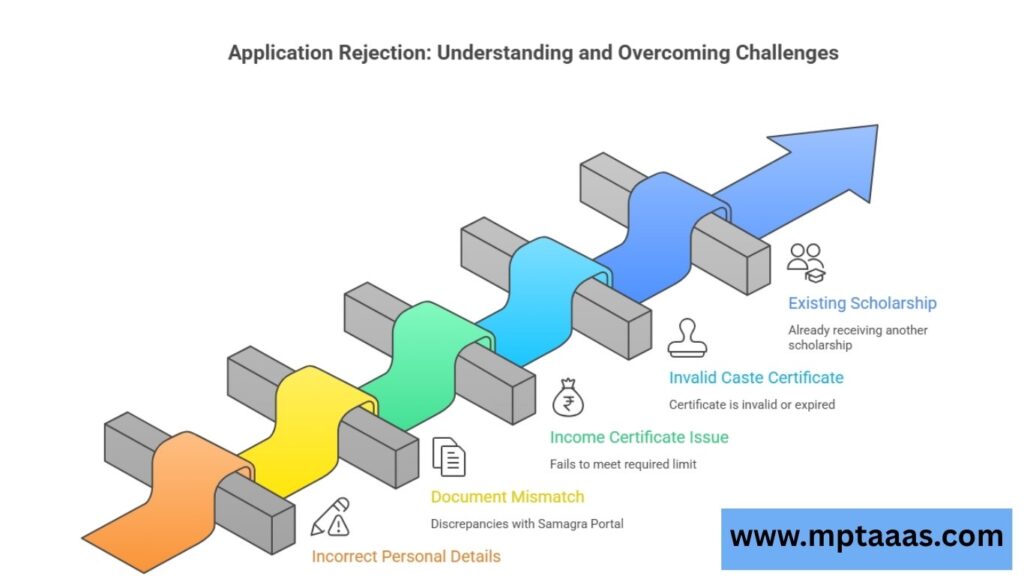
If your status shows Rejected, your application has been turned down. This can feel discouraging, but it does not mean you cannot fix it. The portal usually shows a reason for rejection right below the status.
Common reasons for rejection include:
- Incorrect personal details in the application
- Mismatch between documents and the information on Samagra Portal
- Income certificate not meeting the required limit (below ₹2.5 lakh for SC/ST, below ₹1.5 lakh for OBC)
- Invalid or expired caste certificate
- The student is already receiving another government scholarship
What to do: Read the rejection reason carefully on the portal. Correct the issue on the Samagra Portal first if it is a personal detail mismatch. Then re-apply in the next cycle.
4. Re-upload Required
This means your documents were incomplete, blurry, or uploaded in the wrong format. The portal is asking you to submit clear, corrected versions.
What to do: Log in immediately. Go to your application and re-upload all required documents. Make sure files are clearly scanned, under the size limit allowed by the portal, and in the correct format (JPG or PDF as required).
5. Ineligible
This status means the system has determined that you do not meet the eligibility criteria for the scholarship. This is often connected to data on the Samagra Portal.
What to do: Visit samagra.gov.in and check if your caste, income, and personal details are correctly updated. After correcting, re-submit for verification. Changes on Samagra automatically reflect on MPTAAS within a few days.
MPTAAS Payment Status — Understand Each Stage
Many students confuse Application Status with Payment Status. These are two different things. Your application can be Approved but your payment may still show N/A or Processing. Here is how to understand each payment stage.
Application Status vs Payment Status
Application Status tells you whether your scholarship has been approved or not.
Payment Status tells you whether the money has actually been sent to your bank or not.
Both statuses are visible on your dashboard under the Application Status section.
Payment Status Labels and What They Mean
Sanctioned: The payment has been officially approved. It is now in the process of being transferred to your account. Depending on the bank cycle, it may take a few days to a week to reflect in your account.
N/A: This usually appears when your application is still under verification or has not been approved yet.
Paid / Credited: The amount has been successfully transferred to your bank account.
Failed: The transfer did not go through. This is often due to an inactive NPCI status or a mismatch in bank account details.
What Is NPCI Status and Why It Matters
NPCI stands for National Payments Corporation of India. In simple terms, NPCI status tells the system whether your Aadhaar card is correctly linked to your bank account for receiving DBT payments.
If your NPCI status shows Inactive, your payment will fail even if your scholarship is approved.
How to fix NPCI Inactive status:
- Visit your bank branch.
- Ask them to link your Aadhaar number to your bank account for DBT.
- Once done, it may take 24 to 72 hours to reflect as Active on the MPTAAS portal.
- After that, contact the helpline or raise a grievance to re-process your payment.
MPTAAS Scholarship Amount — Course-wise Table
Here is the scholarship amount you can expect based on your course and residential status:
| Student Type | Course Level | Monthly Amount |
| Day Scholar | Class 11–12 | ₹230 – ₹380 |
| Hosteller | Class 11–12 | ₹380 – ₹570 |
| Day Scholar | Undergraduate | ₹530 – ₹820 |
| Hosteller | Undergraduate | ₹820 – ₹1,200 |
| Day Scholar | Postgraduate / Professional | ₹820 – ₹1,200 |
| Hosteller | Postgraduate / Professional | ₹1,200 – ₹1,500 |
These amounts are credited directly to your bank account through DBT in monthly or quarterly installments.
Documents and eKYC Needed for Status to Move Forward
One of the most common reasons a scholarship stays stuck on Pending is incomplete documentation or a failed eKYC. Here is what you need to have in order.
Aadhaar eKYC — Mandatory Since 2025
Aadhaar eKYC is now compulsory for all MPTAAS scholarship applicants. Without completing eKYC, your application will not move forward.
How to complete eKYC on the MPTAAS portal:
- Log in to your MPTAAS account.
- Go to the eKYC section on the dashboard.
- Enter your Aadhaar number or Virtual ID.
- Choose your verification method — OTP (sent to your Aadhaar-linked mobile) or Biometric.
- Enter the OTP or complete biometric scan.
- Your eKYC will be marked as complete.
Make sure the mobile number linked to your Aadhaar is active. Without OTP verification, eKYC will fail.
Samagra ID Must Match Portal Data
Your Samagra ID is connected to your caste, income, and family details. The MPTAAS portal pulls eligibility data directly from samagra.gov.in. If there is any mismatch — a spelling difference, an outdated income figure, or a wrong caste entry — your application may get stuck or rejected.
Always verify your Samagra data before applying or renewing.
Required Documents Checklist
Keep all these documents ready in clear, scanned format before applying:
- Aadhaar card (for eKYC and identity)
- Caste certificate (valid, issued by appropriate authority)
- Income certificate (annual family income within prescribed limits)
- Latest marksheet (from previous qualifying exam)
- Bank passbook (Aadhaar-linked account)
- Bonafide certificate from your institution
- Active mobile number linked to Aadhaar (for OTP)
Common Problems and How to Fix Them
Problem 1: Status Has Been Pending for a Long Time
Reason: Your nodal officer at college has not verified your documents on the portal.
Fix: Visit your college and personally follow up with the nodal officer. Ask them to log in and verify your application. Do not wait indefinitely — verification must happen for the status to move forward.
Problem 2: Status Is Approved but Payment Is Not Credited
Reason: Most likely your NPCI status is Inactive, or there is a mismatch in your bank account details.
Fix:
- Check your NPCI status on the portal dashboard.
- If Inactive, visit your bank and get Aadhaar linked to your account for DBT.
- If the bank details are wrong, contact the MPTAAS helpline.
- Raise a grievance on the portal if the issue persists.
Problem 3: Status Is Not Updating
Reason: Browser cache, slow server, or the update has not reflected yet.
Fix: Clear your browser cache and try again. Use a different browser if needed. Avoid checking during peak hours (9 AM to 12 PM). The portal can get slow due to high traffic during application season.
Problem 4: Portal Not Working
Reason: Server maintenance or very high traffic load.
Fix: Try accessing the portal during early morning (6 AM to 8 AM) or late night (after 10 PM). If the portal is under scheduled maintenance, it usually resumes within 24 to 48 hours.
Problem 5: Forgot User ID or Password
For Password Recovery:
- Go to the MPTAAS login page.
- Click “Forgot Password”.
- Enter your User ID or Profile ID.
- Follow the on-screen steps to reset via OTP.
For User ID Recovery:
- Click “Forgot User ID?” on the login page.
- Choose one option: Registered Mobile Number, Profile ID, or Samagra ID with Caste Certificate.
- Enter the required details and follow the steps to retrieve your User ID.
MPTAAS Scholarship Renewal — Check Renewal Status Too
If you received the MPTAAS scholarship last year, you need to renew your application every year. The renewal process is similar to a fresh application, but you select Renewal instead of Fresh in the Application Type field.
How to renew your MPTAAS scholarship:
- Log in to your MPTAAS account.
- Go to PMS → Application Apply.
- Select your Academic Year and choose Renewal as the application type.
- Fill in updated academic details — course year, institution name, fee structure.
- Verify all details and submit.
You can track your renewal status using the same Application Status steps mentioned earlier in this guide. If your renewal shows Approved, the scholarship for the current year will be processed.
MPTAAS Helpline and Grievance Support
If you have tried everything and your issue is still unresolved, contact the official support channels directly.
For ST Students — Tribal Affairs Department: Toll-Free: 1800-2333-951
For SC Students — Scheduled Caste Development Department: Toll-Free: 1800-2331-626
For OBC Students — Backward Classes Welfare Department: Phone: 0755-2553329 or 0755-2675521
How to file a grievance on the portal:
- Log in and go to the Grievance section from the main menu.
- Describe your issue clearly — mention your application number and the problem you are facing.
- Submit and note down your complaint reference number.
- Track your complaint by going to Grievance → Track Complaint.
The grievance system ensures that your issue gets officially logged and assigned to the right department. It is more effective than just calling, especially for payment-related problems.
Final Thoughts
Checking your MPTAAS scholarship status is not complicated once you know the steps. The portal gives you full visibility — from the moment you submit your application to the point your money reaches your bank account.
The most important things to remember are simple. Keep your Aadhaar eKYC complete. Make sure your bank account is linked to Aadhaar for DBT. Follow up with your nodal officer if your status stays on Pending for too long.
If you face any issue that the portal cannot resolve, use the official helpline numbers. They are free. The support teams are there specifically to help SC, ST, and OBC students get the scholarship they deserve.
Bookmark the official portal — tribal.mp.gov.in/MPTAAS — and check your status regularly. The sooner you catch a problem, the faster you can fix it.