How to Register MPTAAS Profile ID | Permanent, Unique Identification Number Assigned
The digital landscape of education in Madhya Pradesh is shifting. If you are a student belonging to the SC, ST, or OBC categories, the MPTAAS (Madhya Pradesh Tribal Affairs Automation System) portal is your most important ally. However, as we enter the 2025-26 and 2026-27 academic cycles, simply “having a profile” is no longer enough.
The introduction of the National Scholarship Portal (NSP) One-Time Registration (OTR) and the APAAR ID has added new layers to the process. This guide is your complete roadmap, ensuring you don’t just register, but successfully secure your educational future.
MPTAAS Profile Ecosystem in 2026
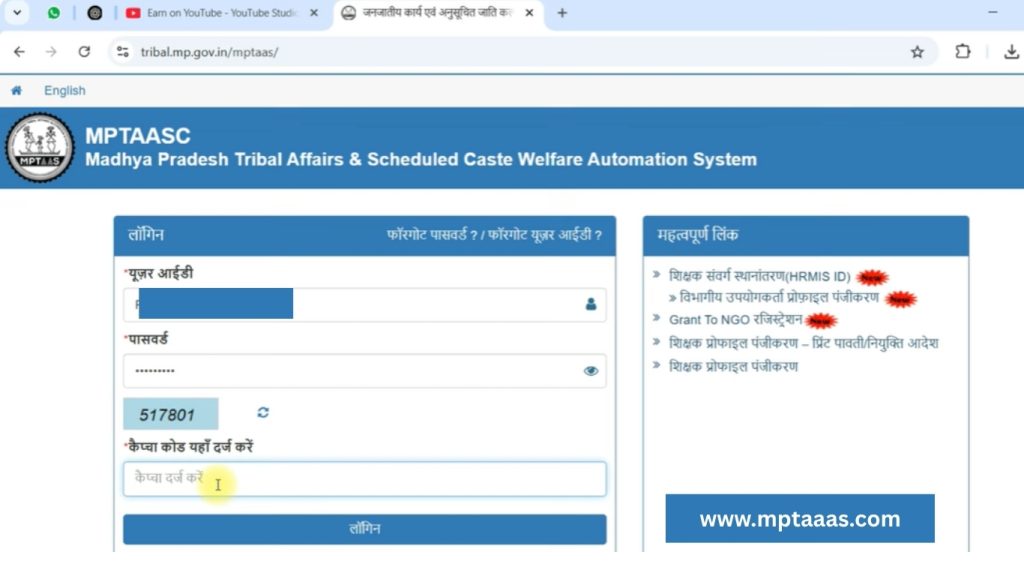
Before you click a single button, you must understand what Hitgrahi Panjiyan truly represents. It isn’t just a username and password; it is your permanent beneficiary identity. The Tribal Affairs Department of Madhya Pradesh created this system to eliminate the middleman, ensuring that scholarships like the Post-Matric Scholarship (PMS) and housing benefits reach your bank account directly.
In 2026, the portal has moved towards a “Unified Identity” model. This means your profile now communicates directly with the National Scholarship Portal (NSP) and the Academic Bank of Credits (ABC). If you ignore these connections, your scholarship application will likely be flagged as incomplete.
The New 2026 Mandates: OTR and APAAR
This is the section that most other guides miss. The government has introduced two major requirements to prevent “Double Scholarship” fraud and to track academic progress nationally.
The 14-Digit NSP OTR
Starting this year, the National Scholarship Portal requires every student to have a One-Time Registration (OTR) number.
- How it works: You must download the NSP OTR App or visit the NSP website.
- Verification: It uses Aadhaar-based Face Authentication (via the Aadhaar Face RD service). No more physical biometrics—your phone’s camera is the key.
- The Link: Once you have your 14-digit OTR, you must log into MPTAAS profile and update it in your profile. Without this, your profile is considered “Inactive.”
The APAAR / ABC ID
The APAAR ID (Automated Permanent Academic Account Registry) is your digital academic resume. It stores your credits and degree details.
- Mandatory: For the 2026-27 session, your MPTAAS profile must fetch your APAAR ID from DigiLocker.
- The Benefit: It automatically verifies that you are a genuine student at your college, speeding up the verification process by the College Principal.
Eligibility Criteria: Who Can Apply?
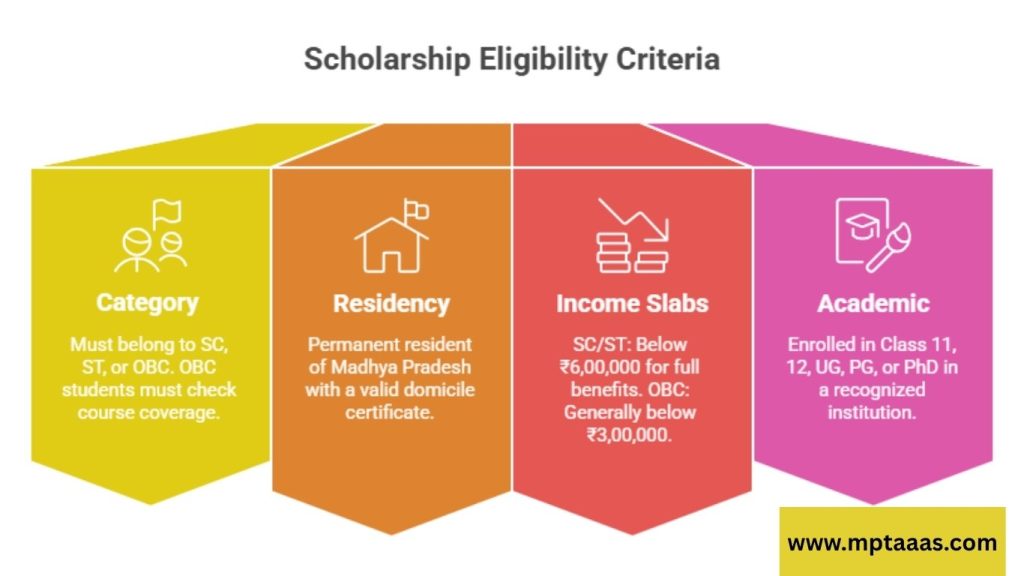
To avoid a “Profile Rejected” status, ensure you meet the updated 2026 criteria:
- Category: Must belong to SC, ST, or OBC (OBC students must check if their specific course is covered).
- Residency: Permanent resident of Madhya Pradesh (A valid M.P. Domicile is a must).
- Income Slabs (Updated for 2026):
- SC/ST Students: Full scholarship benefits if family income is below ₹6,00,000. (Partial benefits apply up to higher limits in specific professional courses).
- OBC Students: Income must generally be below ₹3,00,000 per year.
- Academic: Must be enrolled in Class 11, 12, Undergraduate (UG), Postgraduate (PG), or PhD programs in a recognized institution.
The Essential Document Toolkit
Gathering your documents is 80% of the work. For 2026, ensure your documents are “Digital Ready.”
| Document | Format/Requirement | Why It’s Critical |
| Aadhaar Card | Linked to Active Mobile | Used for e-KYC and OTR verification. |
| Samagra ID | 9-Digit Member ID | Must have completed Samagra e-KYC first. |
| Caste Certificate | Digital (RSK Issued) | The system fetches your category status automatically. |
| Income Certificate | Current FY (2025-26) | Determines your eligibility for free-ship or partial-ship. |
| Domicile Certificate | Digital with Barcode | Proves you are a local resident of MP. |
| Bank Passbook | NPCI/Aadhaar Seeded | Essential for DBT (Direct Benefit Transfer). |
Step-by-Step Guide: MPTAAS Profile Panjiyan (2026 Method)
Step 1: Initiation and Samagra Linkage
Visit the official MPTAAS Portal. Click on “New Beneficiary Profile Registration.” The first thing the system asks for is your 9-digit Samagra Member ID.
- Warning: If your name in Samagra is “Rohan” but your Aadhaar says “Rohan Kumar,” you must fix this at the Samagra portal before proceeding.
Step 2: Personal Details and Aadhaar e-KYC
The system will pull your basic details from the Samagra database. Next, you must provide your Aadhaar number. Choose the OTP method. Once you enter the code sent to your phone, your identity is “Aadhaar Verified.” This makes your profile incredibly secure.
Step 3: Verification of Social Identity (Caste)
Enter your Digital Caste Certificate number. The portal will ping the e-District servers. If valid, your father’s name, caste, and sub-caste will be auto-populated. You cannot edit this manually, which prevents errors and fraud.
Step 4: Contact and Address Details
Provide your current residential address. This is where your permanent PR Number (Profile ID) will be registered. Ensure your mobile number is one you plan to keep for at least 4 years—this is where your scholarship alerts will come.
Step 5: Income and Domicile Declaration
Upload your Digital Income Certificate details. The system will check the date of issue. Remember, if your income certificate is older than 3 years, you may need to apply for a fresh one before completing your Hitgrahi Panjiyan.
Step 6: Creating Credentials (PR Number)
Choose a strong password (e.g., Mypass@2026). Once you submit, the portal will generate your Profile ID, which starts with “PR” followed by numbers. This is your “Roll Number” for life in the Tribal Welfare Department.
Linking Your OTR and APAAR ID
Once you have your PR ID, your job isn’t done.
- Login to MPTAAS using your new ID.
- Navigate to the “Update OTR” section on the dashboard.
- Enter your 14-digit NSP OTR.
- The system will fetch your photo and details from the NSP database.
- Click “Sync APAAR ID” to link your academic credits.
Troubleshooting Common Roadblocks
The “NPCI Mapping” Issue
The most frustrating error is having a verified profile but a “Payment Failed” status. This is almost always due to NPCI.
- The Fix: Your bank account must be “Aadhaar Seeded.” Go to your bank and submit a “DBT Consent Form.” You can check your status on the MPTAAS dashboard under “Profile Detail.”
Aadhaar Face RD Errors
When generating your OTR, the Face RD app might fail.
- Tip: Ensure you are in a well-lit room with a plain background. Do not wear glasses or a hat. If it fails, try the OTP-based registration on the NSP web portal instead.
Forgotten Password or PR Number
If you lose your credentials, don’t create a new profile!
- The Fix: Use the “Forgot User ID” link. You will need your Aadhaar and mobile number. Creating a duplicate profile will lead to both being blocked.
How to Apply for Scholarship (PMS) Post-Registration
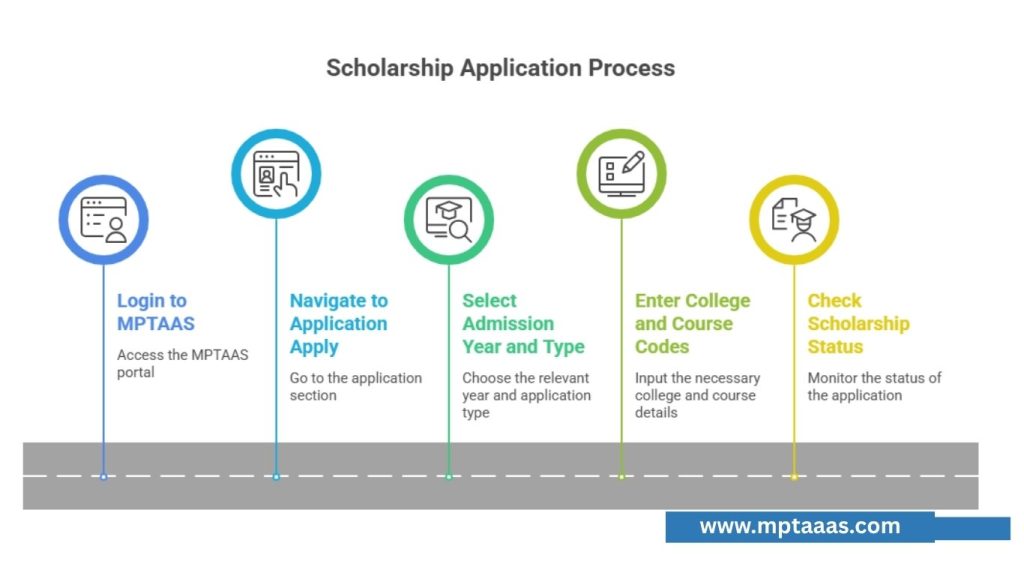
Registration is only the first step. To get the money:
- Login to MPTAAS.
- Go to PMS -> Application Apply.
- Select Admission Year (e.g., 2025-26) and Application Type (Fresh for 1st year, Renewal for others).
- Enter your College Code and Course Code.
- Check your Scholarship Status regularly. It will move from “Pending” to “Verified” to “Payment Disbursed.”
Final Thoughts
Managing your MPTAAS Profile in 2026 is about staying proactive. With the integration of NSP and APAAR, the system is becoming smarter and faster. If you keep your Aadhaar linked and your bank NPCI-mapped, you will never have to worry about missing a scholarship payment.
Take pride in this digital identity. It is your key to unlocking the support you deserve to finish your studies and build a career.